

Sharing an Idea
Ideas go straight to the RHONDOS product team. Once an idea is approved, it opens up for voting so other customers can help us prioritise it.
Submitting an idea
-
Open the form
On the portal home, click Share an idea in the header, or + Add an idea in the "Have an idea?" section.

-
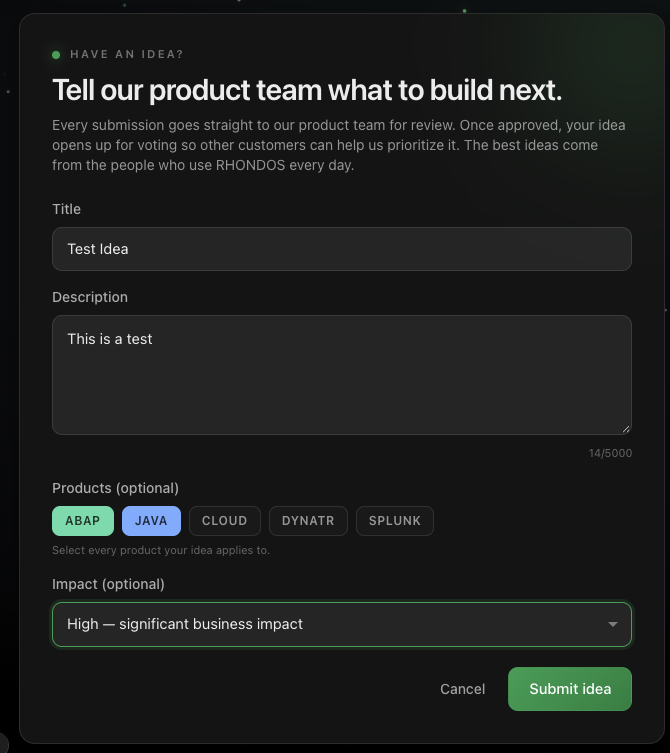
Fill in the fields
|
Field |
Required |
Notes |
|---|---|---|
|
Title |
Yes |
A short, descriptive summary of the idea |
|
Description |
Yes |
What you need and why. Up to 5,000 characters |
|
Products |
No |
Select every product the idea applies to: ABAP, JAVA, CLOUD, DYNATR, SPLUNK |
|
Impact |
No |
How significant the change would be for your business |
The more context you give in the description, the easier it is for the product team to evaluate the idea.
-
Click Submit idea
Your idea is sent for review.
What happens next
Your idea appears in the Your ideas panel on the portal home with the status Pending Review, so you can follow it from review to voting to the roadmap.
Once the product team approves it, the idea moves to the Vote on what we build next section, where any customer can vote on it. The most voted ideas rise to the top and carry real weight when we plan the roadmap.
Approved ideas that we take on appear in the Product roadmap section on the portal home.
Questions
If you have something to share that does not fit the form, write to customersuccess@rhondos.com.