

How to re-send historical metric data collected by PowerConnect to Splunk or Dynatrace.
To send historical data of a metric to your output platform (Splunk or Dynatrace), perform the following steps.
-
Login in SAP client in which PowerConnect is configured
-
run /n/bnwvs/main
-
Goto menu Goto → Test metrics
-
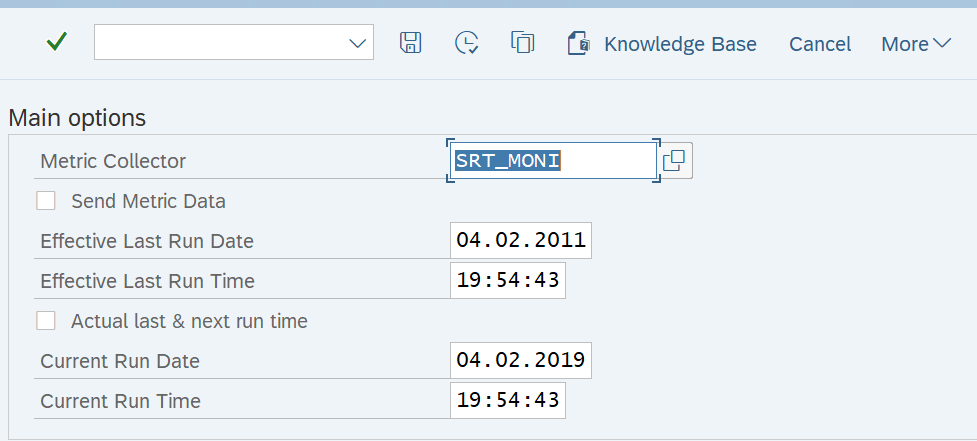
Select the metric whose historical data is to be uploaded. For Example SRT_MONI
-
Select the time in history for which the data is to be sent.
DYNATRACE PLATFORM ONLY: data is limited to the last 24 hours.
-
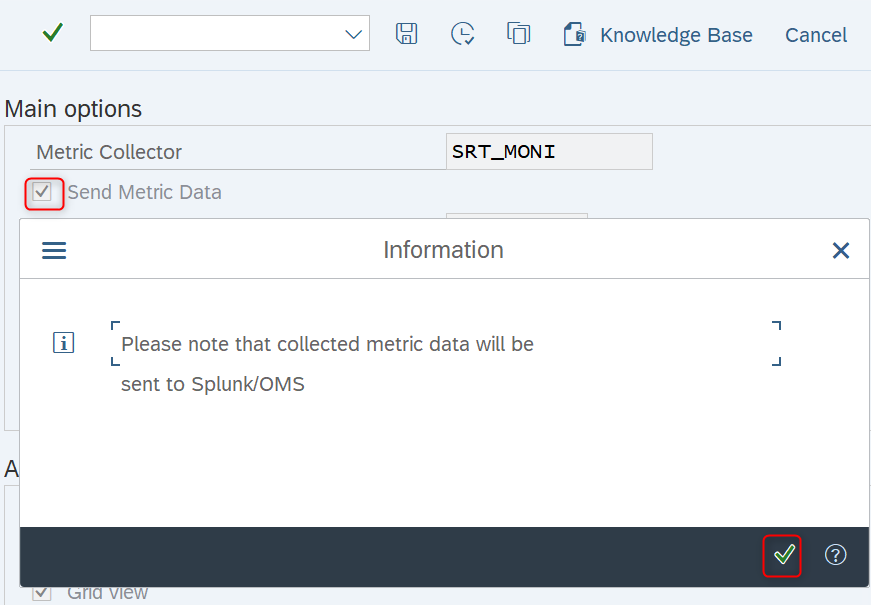
Hit the check mark “Send Metric Data“ as shown below and confirm the pop-up
-
Execute the transaction and check to see if you have received the required data in your output platform (Splunk or Dynatrace).
When sending data from a larger time range, you may want to break it down to smaller chunks to ensure that the data ingest is not overshot and also that no memory and timeout dumps occur in your SAP system
You can only get historical data when it is available in SAP (time based extraction). If it is snapshot based extraction (NRIV, SM51, SM12 and others), then you cannot get data from the past