

KB 237 (Dynatrace) - PowerConnect integration with Dynatrace ActiveGate - Best Practice Guide
|
Category: Information |
Priority: Info |
|---|---|
|
Platform: Dynatrace ActiveGate |
Version: 1 from 06.11.2025 |
Description
This document provides the best practice guide to help integrate PowerConnect data with ActiveGate and then to the Dynatrace Cluster
Cause
In certain customer environments, it’s important to ensure that all data exchange remains within the company’s IT boundaries. In these cases, we recommend using Dynatrace ActiveGate to maintain secure, internal communication and data flow.
Resolution
Dynatrace ActiveGate is required to securely and efficiently enable communication between the Dynatrace platform in the cloud and internal environments, hosts, or monitoring data sources within private networks.
Product version
|
Product |
From |
To |
|
PowerConnect for Dynatrace |
xxx |
xx |
Overview
ActiveGate plays an important role as a secure intermediary between on-premise systems and the Dynatrace SaaS environment. While PowerConnect is capable of pushing data directly to Dynatrace, the use of ActiveGate becomes essential in certain network architectures — particularly in environments where corporate security policies restrict direct communication between SAP systems and external SaaS platforms.
In such cases, ActiveGate acts as a controlled and trusted entry point within your organisation’s network. It receives the data transmitted by PowerConnect and securely forwards it to the Dynatrace cluster. This ensures that data transfer fully complies with internal firewall and security rules.
Process steps
-
Ensure that a certificate (Self-signed or CA-signed ) is installed on Dynatrace Active Gate using the documentation here: https://docs.dynatrace.com/docs/setup-and-configuration/dynatrace-activegate/configuration/configure-custom-ssl-certificate-on-activegate
Responsibility: Dynatrace Team of the customer or the company Positive Test: Common Name should not mention ActiveGate. It should be the hostname from which the certificate is generated from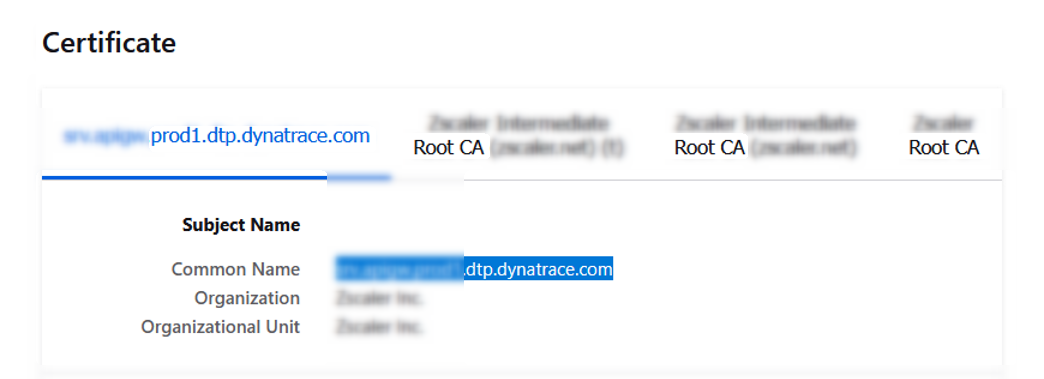
Export this certificate and import in STRUST of SAP ABAP system.
Note: The CN name of the certificate should fully match the hostname provided in the connection setup of PowerConnect.
Example:
Hostname: activegate-non-prod.<<customer>>.com
CN = activegate-non-prod.<<customer>>.com, 0 = 0 <<Customer>>, C = Country
1.1 Workaround for Point Number 1:
a) Export the Dynatrace default ActiveGate Certificate
b) Install this certificate in the SAP ABAP STRUST ( Client-Standard, Client-Anonymous, and Server-Standard )
c) In all the SAP application servers of the SID make the following host entires:
ca) \> vi /etc/hosts
cb) Add the following entry
<IP Address of Active Gate> ActiveGate <Fully Qualified hostname of Active Gate>
Example:
10.17.173.01 ActiveGate wddynad.customer.name.com
2. Identify the right URL of Dynatrace to Ingest PowerConnect logs and traces on Active Gate.
Open Telemetry logs ingest Documentation: https://docs.dynatrace.com/docs/ingest-from/opentelemetry/getting-started/otlp-export
Standard logs ingest: https://docs.dynatrace.com/docs/discover-dynatrace/references/dynatrace-api/environment-api/log-monitoring-v2/post-ingest-logs
Logs:
https://{your-activegate-domain}:9999/e/{your-environment-id}/api/v2/logs/ingest
Traces:
https://{your-activegate-domain}:9999/e/{your-environment-id}/api/v2/otlp/v1/traces
-
Create a Dynatrace API Token that ingests logs and Open Telemetry traces to Dynatrace, which will be used in connection setup with PowerConnect
Documentation: https://docs.dynatrace.com/docs/discover-dynatrace/references/dynatrace-api/basics/dynatrace-api-authentication
V2 Scopes to assign:
logs.ingest
openTelemetryTrace.ingest
Storage:logs:read
storage:logs:write
-
Outbound Firewall Clearance to ActiveGate
From a technical perspective, the only required change to enable this setup is the outbound firewall rule allowing communication between PowerConnect and the ActiveGate host. No additional components, configurations, or modifications to PowerConnect are necessary.
In summary, while ActiveGate is optional in open network environments, it becomes an important security and compliance component in more restricted corporate architectures — with minimal implementation impact.