

Configuration Steps
The agent configuration is stored a properties file located in the directory configured during the installation steps e.g.
$BOBJ_HOME/tomcat/conf/powerconnect.properties
The configuration file can be modified using the PowerConnect for SAP Data Services UI. The steps to configure the agent consist of:
-
Applying a license key for the agent to start collecting data
-
Applying the PowerConnect user credentials created during the pre-installation steps
-
Setting the JMX RMI URL from the pre-installation steps
-
Configuring an outbound connection
-
Enabling the various extractors to collect data
These can be achieved by following the steps below:
Applying a License Key
-
Login to the PowerConnect Agent UI by browing to: http(s)://cmchost:port/powerconnect-java/index.html
e.g. http://localhost:8080/powerconnect-java/index.html -
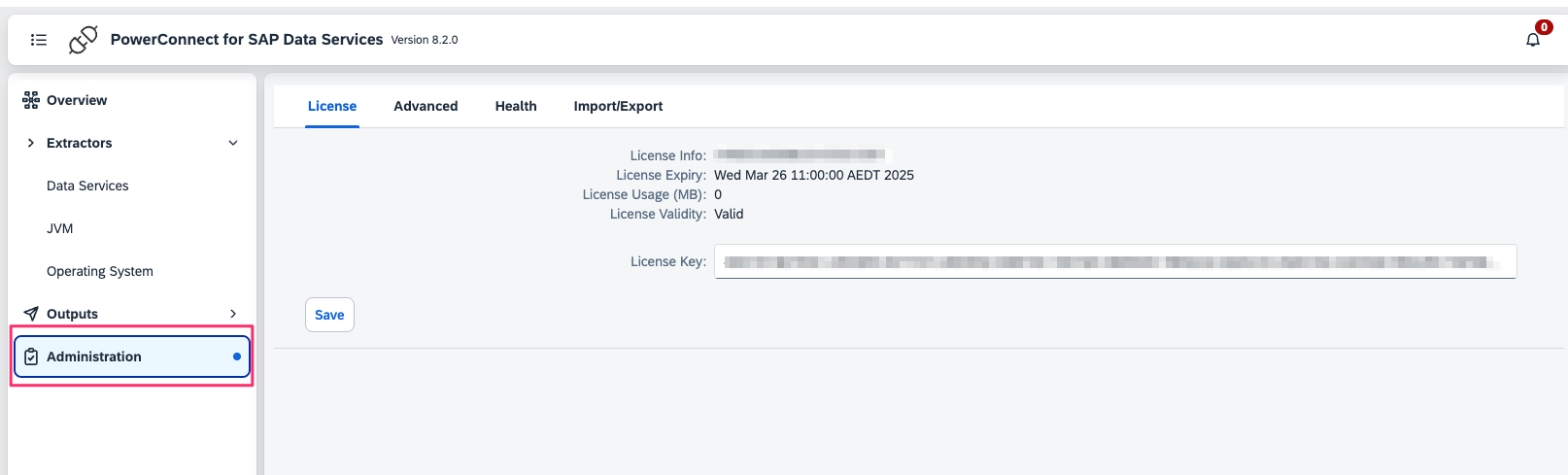
Click Administration in the menu on the left and enter the License key
-
Click Save
-
The license details should be displayed
-
The license key is now applied
-
Restart the PowerConnect Agent (only required the first time the license is applied)
-
This can be achieved by either:
-
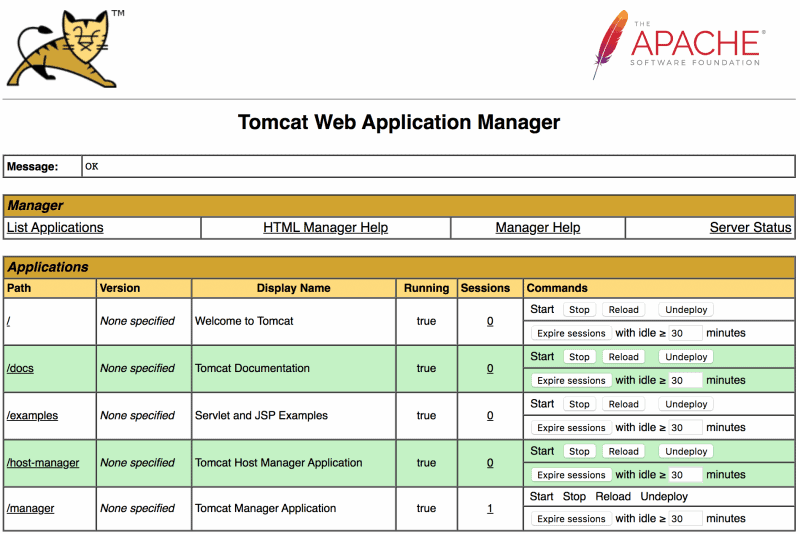
Using the Tomcat Web Application Manager under http[s]://<server>:<port>/manager/html and clicking Stop then Start on the /powerconnect-java path
-
Or restarting the Tomcat instance
-
Applying the PowerConnect user credentials
-
In the PowerConnect Agent UI click Overview in the menu on the left
-
Under the Authentication section enter the PowerConnect username and password created in the pre-installation steps
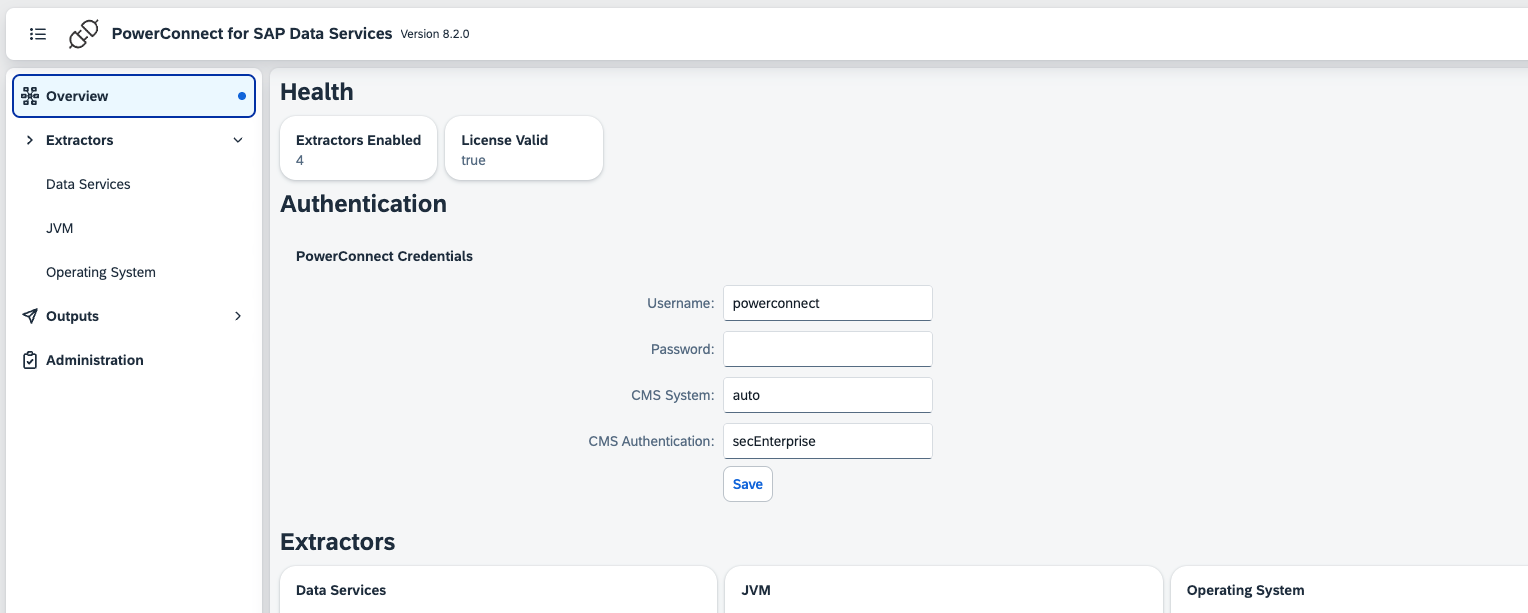
Note - The CMS System and CMS Authentication should be left at default values unless there is a problem with authentication
-
Click Save
-
The PowerConnect credentials have now been applied
Setting the JMX RMI URL
-
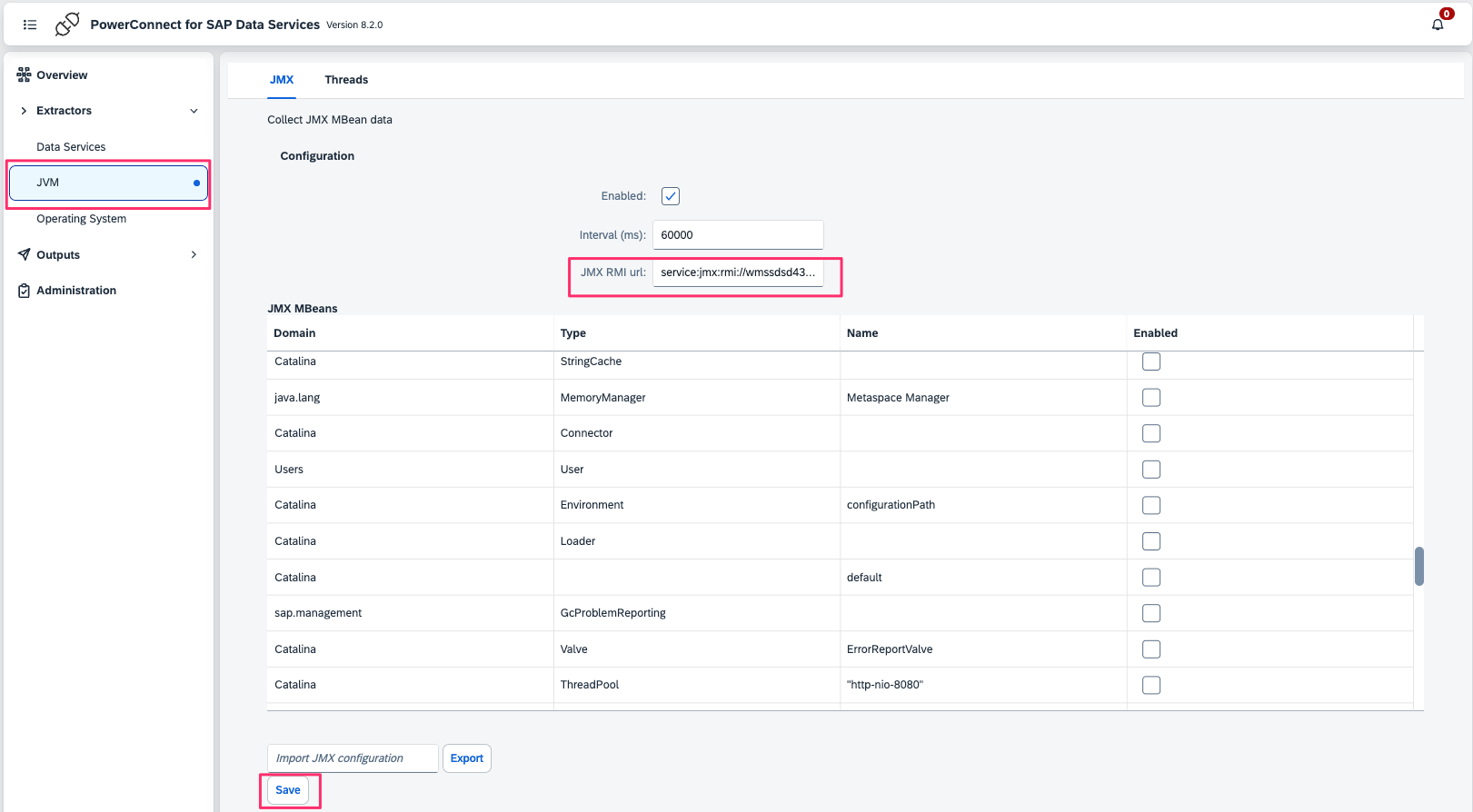
In the PowerConnect Agent UI click JVM under the Extractors menu on the left
-
Enter the JMX RMI URL
-
Click Save
-
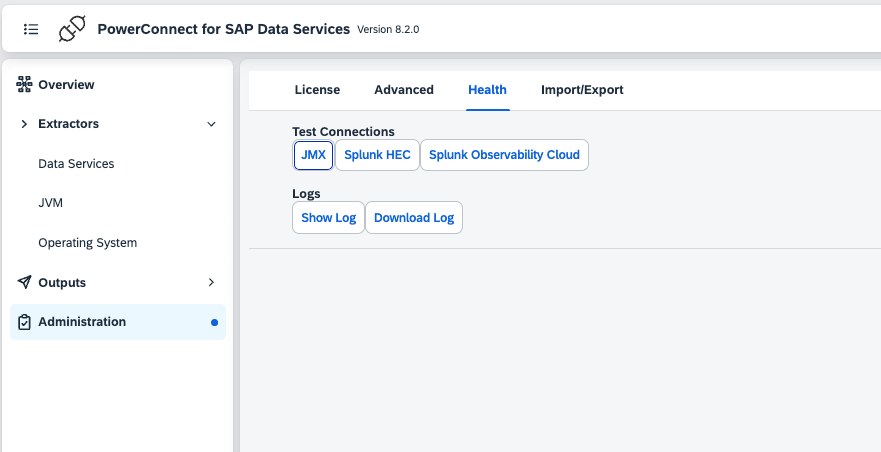
Click Administration in the menu on the left and click the Health tab
-
Under Test Connections click JMX
-
The JMX Connection test should be successful
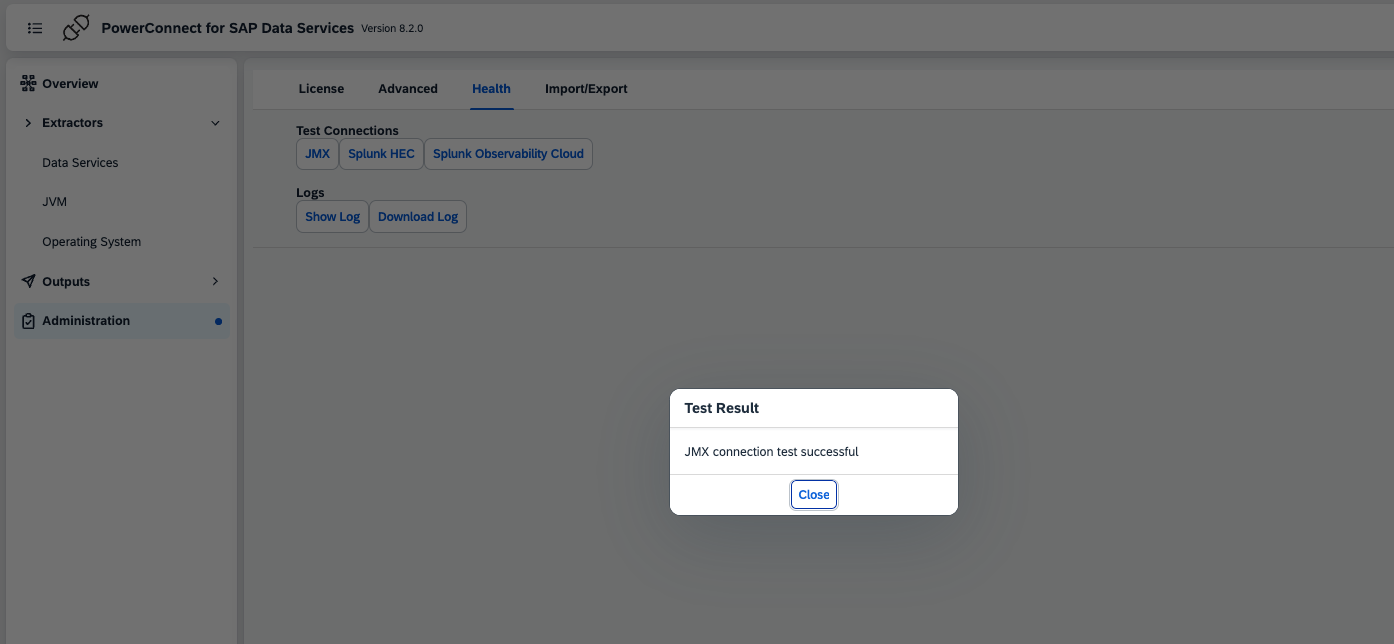
Note - If the test fails it means the JMX RMI URL is incorrect or the PowerConnect user credentials are incorrect
-
The JMX RMI URL is now configured
Creating an Outbound Connection
-
To configure an outbound connection follow the configuration guide for the target platform
Enabling Extractors
-
In the PowerConnect Agent UI click Overview in the menu on the left
-
In the Extractors section there are various extractors that can be enabled:
-
Data Services - Job Logs: Collects Data Services batch job status and logs
-
JVM - JMX: Collects various JMX MBean metrics such as CPU usage, Heap usage, Garbage Collection and various Data Services specific metrics
-
JVM - Threads: Collects thread states, cpu usage and stack traces
-
Operating System: CPU - Operating system CPU usage (Linux only)
-
Operating System: Memory - Operating system Memory usage (Linux only)
-
Operating System: Disk Space - Operating system Disk space usage (Linux only)
-
Operating System: Network IO - Operating system Network Interface IO (Windows and Linux only)
-
Operating System: Disk IO - Operating system Disk Device IO (Windows and Linux only)
-
-
Check the extractors required
-
Click Save
-
The Extractors are now enabled
Configuration Options
|
Configuration |
Description |
Required |
Default Value |
Comments |
|---|---|---|---|---|
|
license_key |
License key for the agent |
True |
|
|
|
powerconnect_user |
User for the agent to use to collect data from web services and jmx |
True |
|
|
|
powerconnect_password |
Password for the PowerConnect user |
True |
|
|
|
cms_system |
Which CMS system that PowerConnect user should connecto to |
False |
auto |
Setting to auto means the agent will try to automatically discover the CMS system endpoint. Do not change this setting unless there is a problem with authentication |
|
cms_authentication |
The type of authentication used |
False |
secEnterprise |
Do not change this unless there is a problem with authentication |
|
jmx_enabled |
Enable the JMX extractor |
False |
true |
|
|
jmx_rmi_url |
The JMX RMI url |
True |
|
This should be set to the JMX RMI in the pre-installation steps |
|
jmx_mbeans |
List of JMX Mbeans to collect |
False |
java.lang:type=OperatingSystem;java.lang:type=Threading;java.lang:type=Memory;java.lang:type=ClassLoading;java.lang:type=Runtime |
|
|
jmx_interval |
How often to collect JMX data (ms) |
False |
60000 |
|
|
cpu_monitoring_enabled |
Enable operating system CPU monitoring |
|
false |
|
|
cpu_monitoring_interval |
How often to collect CPU metrics (ms) |
|
60000 |
|
|
memory_monitoring_enabled |
Enable operating system memory monitoring |
|
false |
|
|
memory_monitoring_interval |
How often to collect memory metrics (ms) |
|
60000 |
|
|
os_process_monitoring_enabled |
Enable operating system process monitoring |
|
false |
|
|
os_process_monitoring_interval |
How often to collect process metrics (ms) |
|
60000 |
|
|
disk_monitoring_enabled |
Enable disk iops monitoring |
|
false |
|
|
disk_monitoring_interval |
How often to collect disk iops metrics (ms) |
|
60000 |
|
|
disk_space_monitoring_enabled |
Enable disk space monitoring |
|
false |
|
|
disk_space_monitoring_interval |
How often to collect disk space metrics (ms) |
|
60000 |
|
|
network_monitoring_enabled |
Enable network interface monitoring |
False |
false |
|
|
network_monitoring_interval |
How often to collect network interface metrics (ms) |
False |
60000 |
|
|
thread_monitoring_enabled |
Enable thread monitoring |
False |
false |
|
|
thread_monitoring_interval |
How often to collect thread data (ms) |
False |
60000 |
|
|
ds_job_monitoring_enabled |
Enable Data Services Job monitoring |
False |
false |
|
|
ds_job_monitoring_interval (ms) |
How often to collect job data |
False |
60000 |
|
|
db_job_monitoring_lag |
Lag setting for audit log collection (ms) |
False |
60000 |
This setting is to deal with scenarios where there is a lag between the data being written to the Data Services database and its availability for query via the Web Service (usually high load) |
|
ds_job_monitoring_repositories |
Which repositories to collect job data from |
False |
auto |
Setting to auto means the agent will try and discover the repositories available. Otheriwse a comma separated list of repository names can also be provided |
|
ds_job_monitoring_trace_logs |
Collect trace logs for each job |
False |
false |
|
|
ds_job_monitoring_monitor_logs |
Collect monitor logs for each job |
False |
false |
|