

KB 149 (ABAP): Metric extension functionality
|
Category: Problem/Information/Recommendation |
Priority: Normal |
|---|---|
|
Platform: ABAP/SAP Cloud |
Version: 1 from 26.03.2021 |
Description
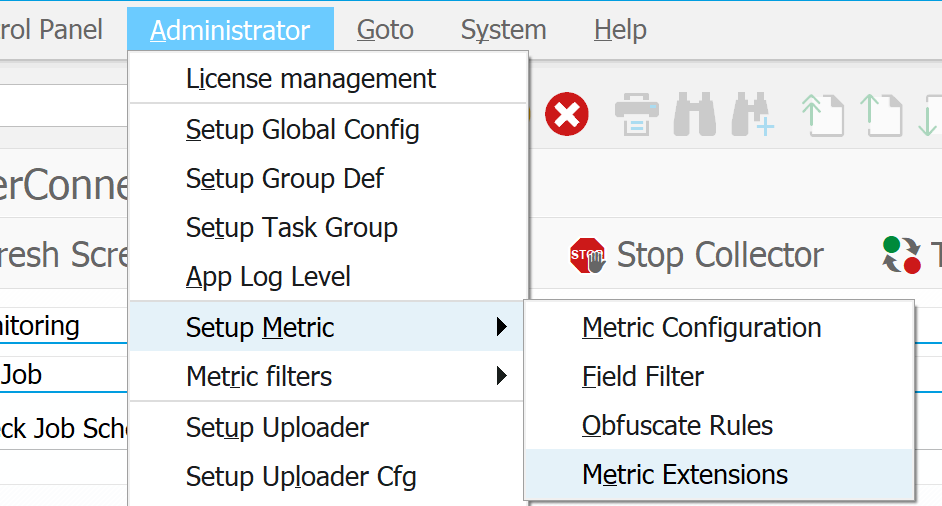
Starting from PowerConnect SP 6.04, it is possible to enhance metrics with custom fields based on simple conditions. The configuration is available via Administrator->Setup Metric->Metric Extensions menu option.
Metrics which needs to be enhanced defined on the left side of the screen:

Group Definition: name of the metric;
Sub Group Definition: subgroup which should be enhanced;
Field name: custom field name (actual field in Splunk will have ‘PC_’ prefix, i.e. PRIORITY->PC_PRIORITY);
Description: free text/comment to define the reason;
Active: flag to switch on/off the setup;
After necessary fields are added, it is possible to define values based on simple conditions by double-click on the necessary record/field.

In the sample case above, custom field PRIORITY (will receive PC_PRIORITY name on Splunk side) could have two values: “Low” and “High”. Conditions for each of them needs to be defined by clicking on Condition button:
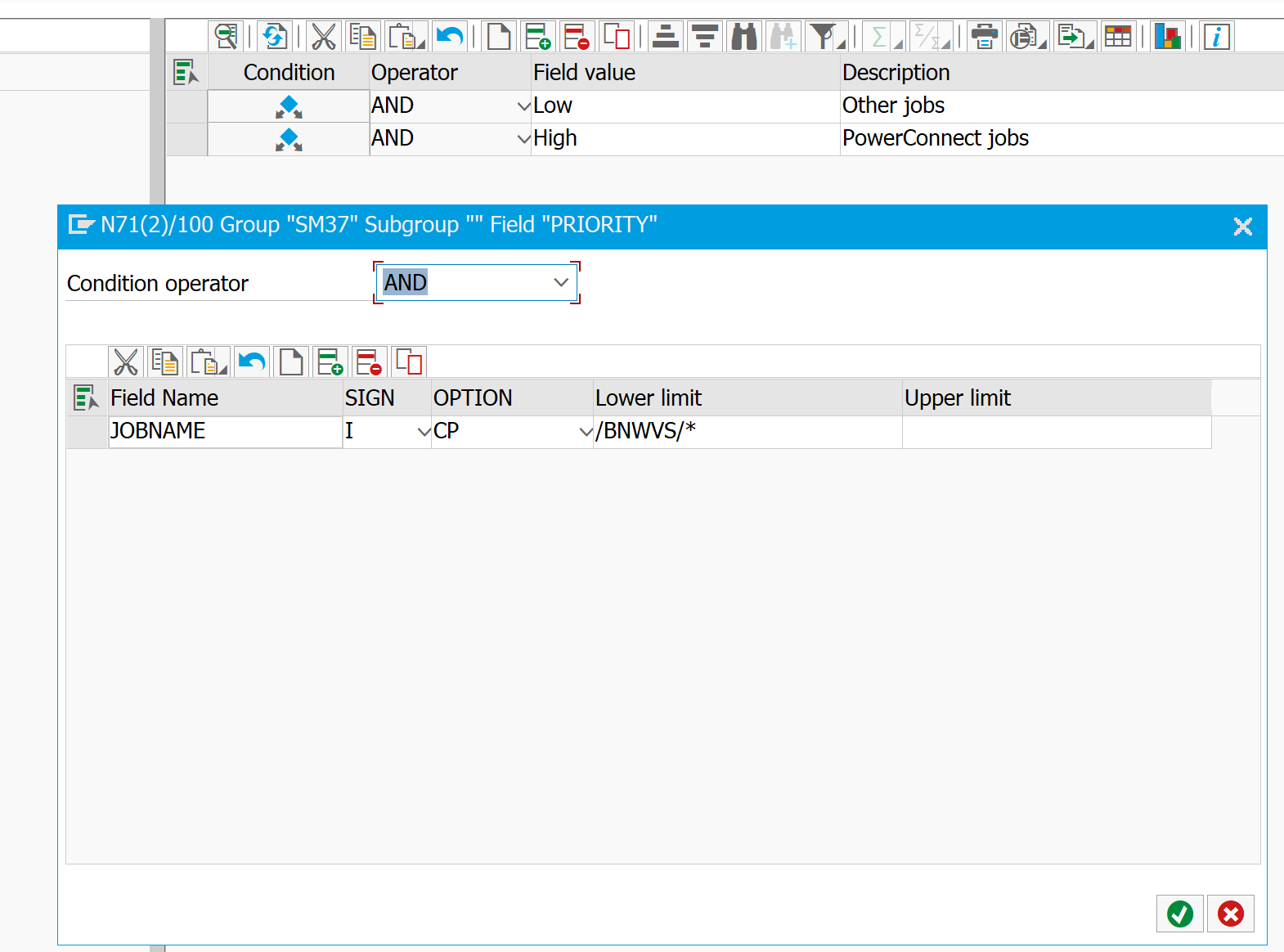
It is possible to use any fields which are available within the selected group definition/event. For instance, on the screen above field JOBNAME is used, which is available in SM37 event. Operator dropdown has two options: ‘AND’ and ‘OR’. In case ‘AND’ is selected, all conditions will be considered together (all should match), ‘OR’ operator is used when any of conditions is acceptable.
Field Name: field name of the event;
Sign: Include (I) or Exclude (E) condition;
Option: compare option, one of options below:
|
Operator |
Description |
|
EQ |
Equal: True, if the content of operand1 matches the content of operand2. |
|
NE |
Not Equal: True, if the content of operand1 does not match the content of operand2. |
|
LT |
Lower Than: True, if the content of operand1 is smaller than the content of operand2. |
|
GT |
Greater Than: True, if the content of operand1 is greater than the content of operand2. |
|
LE |
Lower Equal: True, if the content of operand1 is lower than or equal to the content of operand2. |
|
GE |
Greater Equal: True, if the content of operand1 is greater than or equal to the content of operand2. |
|
CP |
Match a pattern |
|
NP |
Patter not matching |
|
BT |
Between |
|
NB |
Not between |
Lower limit: value to compare with
Upper limit: value to compare with as the high limit in the range;
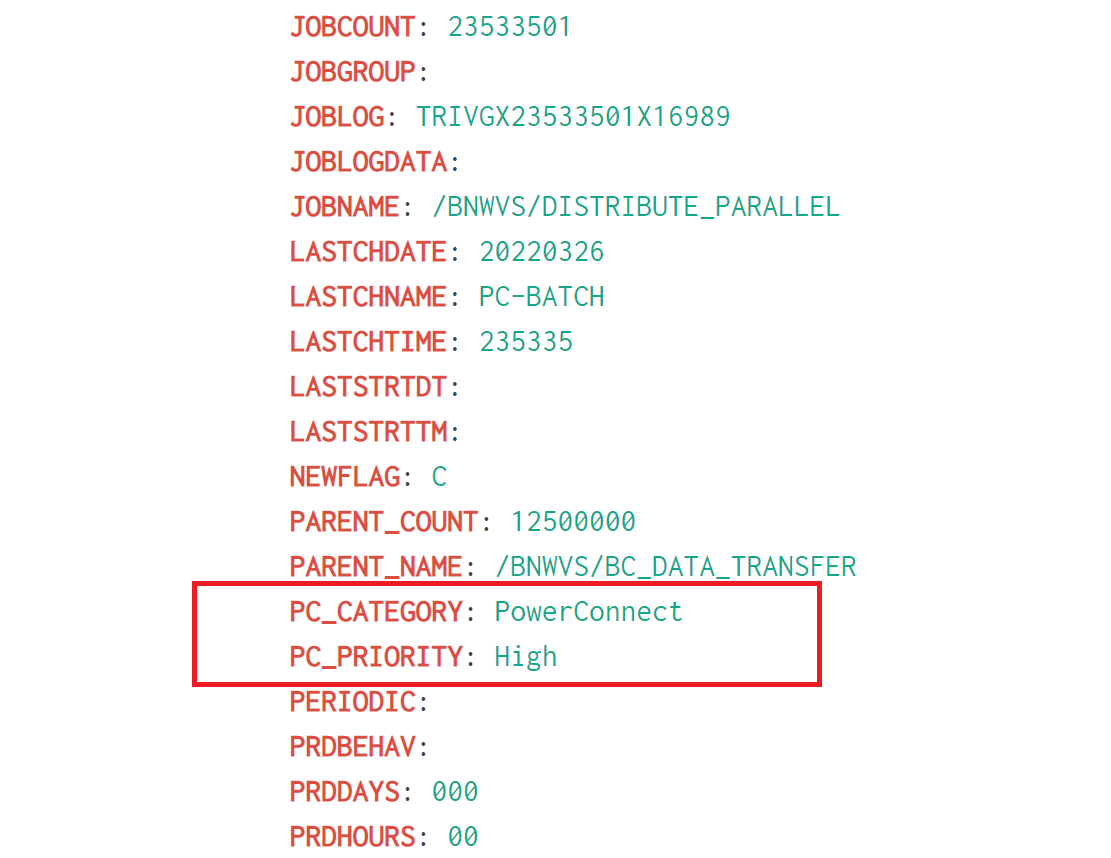
After the conditions are maintained, all events which match to the defined conditions will receive appropriate value. According to the sample configuration, jobs with prefix /BNWVS/ will get new field PC_PRIORITY with value “High”.
Values with no conditions defined has lowest priority and will be used if none of others values are applicable to the event.
Event on Splunk side:
Product version
|
Product |
From |
To |
|
PowerConnect NW,S4HANA,S4HANA Cloud |
6.04 |
* |