

|
Category: Problem |
Priority: Normal |
|---|---|
|
Platform: Splunk |
Version: 1 from 18.123.2023 |
Description
The source selection dropdown does not populate results on dashboards featuring database, cloud, or java data.
Cause
An error in the macro used to populate the dropdown causes no results to return.
Resolution
-
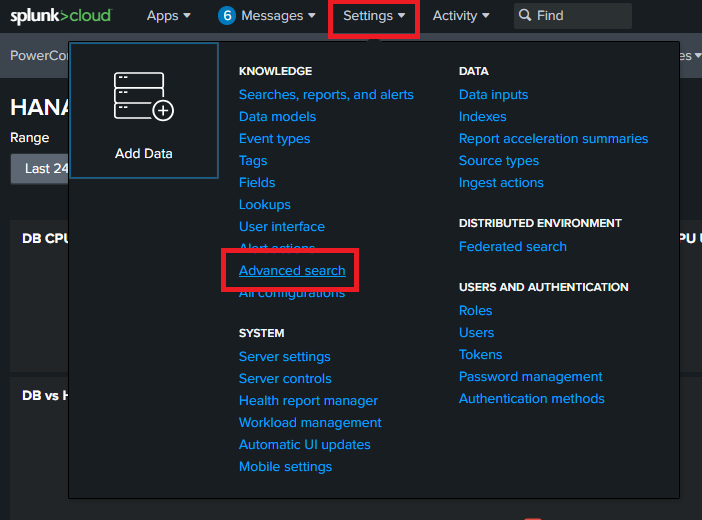
Go to “Settings”
-
Click on “Advanced search”
-
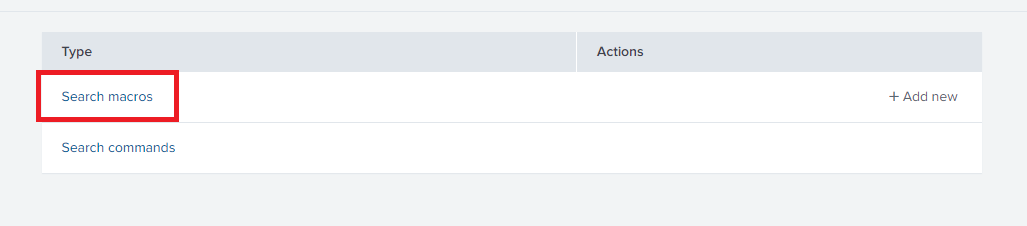
Select “Search macros”
-
Find and open the “sap-systems(2)” macro

-
Change “XOR” to “OR” as shown below:
BeforeSplunk SPLinputlookup pc_sap_systems | search sys_type="*$sys_type$*" AND (sys_subtype="*$sys_subtype$*" XOR db_type="*$sys_subtype$*")After
Splunk SPLinputlookup pc_sap_systems | search sys_type="*$sys_type$*" AND (sys_subtype="*$sys_subtype$*" OR db_type="*$sys_subtype$*")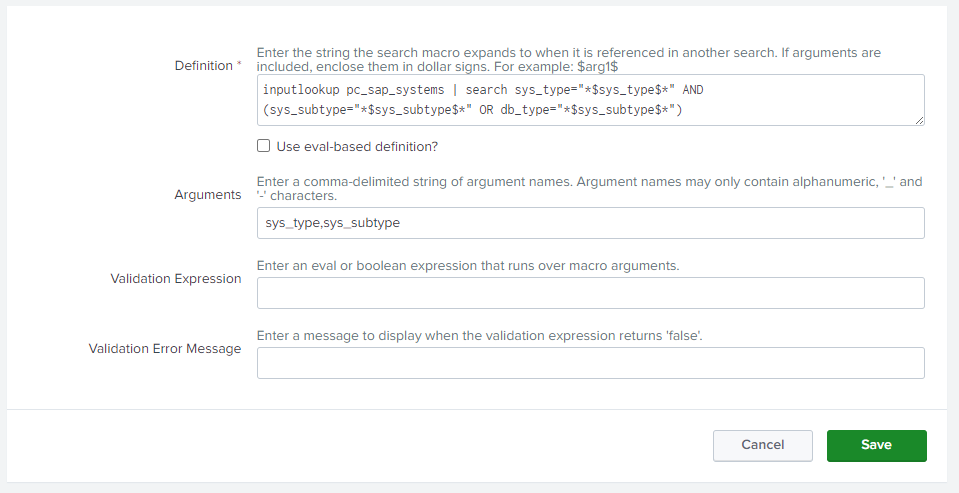
-
Click “Save”