

KB 87 (ABAP): Support Pack 5.09 to 6.0 Upgrade
|
Category: Information |
Priority: Normal |
|---|---|
|
Platform: ABAP |
Version: 1 from 23.03.2021 |
Description
Please follow the following steps to upgrade the PowerConnect application from Support Pack 5.09 to 6.0.
-
Log into the managed system where the upgrade is planned, and execute the /n/bmwvs/main transaction.
-
Stop the collector job by selecting thec”Stop Collector” button .
-
Wait to confirm that all metrics have been sent to Splunk.
-
Stop the remaining jobs using the “Toggle Uploader” and the “Stop Check Job” buttons.
-
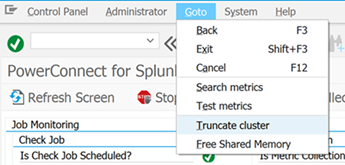
Clean-up all metric tables using the Goto->Truncate cluster functionality. This is needed, since the metric serialization approach is changed, and it might cause issues once uploading is started after upgrade:
-
Use SPAM to apply 5.10;
-
Use SAINT to upgrade to 6.0;
-
Transport the hotfixes (STMS) for SP 6.00 if any shared;
-
Activate BC set /BNWVS/BCSET_500 (Tcode=SCPR20)
-
Start PowerConnect Background jobs.
Product version
|
Product |
From |
To |
|
PowerConnect NW, S4HANA, and S4HANA Cloud |
5.09 |
6.0 |