

KB 94 (Java NW): Stopping and Starting PowerConnect From Command Line
Category: Information
Platform: Java (NW)
Priority: Normal
Version: 1 from 23.03.2021
Description
If you want to stop or start the PowerConnect Java agent, and have no access to the NetWeaver administrator /nwa, you can stop or start the app from the command line. This can be done using SAP J2EE telnet.
Start PowerConnect From Command Line
Please the following steps:
-
telnet <J2EE host> 5<XX>08 # XX is instance number
-
<login as admin user>
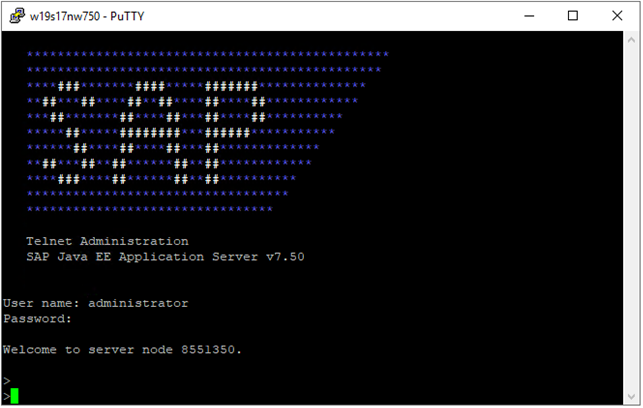
-
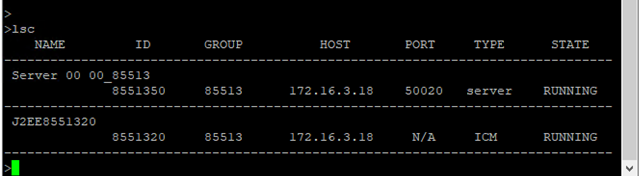
lsc # Check node list, where ID is displayed
-
jump <ID of problematic server node>

-
Use the following command to display the applications
-
To get the status of a PowerConnect application
-
list_app | grep -i power
-
-

-
To get all references for this application
-
app_refs_graph <app_name>
-

-
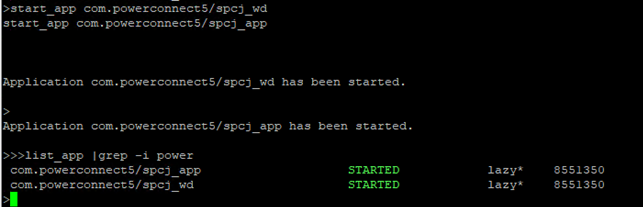
To start the PowerConnect Java application execute the following commands:
-
start_app com.powerconnect5/spcj_wd
-
start_app com.powerconnect5/spcj_app
-
Stop PowerConnect From Command Line
-
telnet <J2EE host> 5<XX>08 # XX is instance number
-
<login as admin user>
-
lsc # Check node list, where ID is displayed
-
jump <ID of problematic server node>
-
Use the following command to display the applications
-
To get the status of a PowerConnect application
-
list_app | grep -i power
-
-
-
To get all references for this application
-
app_refs_graph <app_name>
-
-
To start the PowerConnect Java application execute the following commands:
-
stop_app com.powerconnect5/spcj_wd
-
stop_app com.powerconnect5/spcj_app
-

Product version
|
Product |
From |
To |
|
PowerConnect [NW,S4HANA,S4HANA Cloud] |
[Affected version from] |
[Affected version to] |
[SAP product version]
|
Product |
Component |
From |
To |
|
|
|
|
|